If you want to create cool designs, videos, or art, Adobe tools can help. Adobe has many programs for creators. Some tools are easy for beginners. Others are for more skilled users.
In this article, you will learn about the best Adobe tools. These tools can help you grow from a beginner to a pro. We will talk about what each tool does and why you should try it.
Why Use Adobe Tools?
Adobe tools are popular all over the world. Many artists, designers, and video makers use them. These tools help make projects look good and professional. Adobe offers many tools for different types of work. You can find a tool that fits your needs.
Also, Adobe tools work well together. You can move your work from one tool to another easily. This helps you create better and faster.
1. Adobe Photoshop – The Image Editor
Photoshop is the most famous Adobe tool. It helps you edit photos and create images. You can change colors, remove parts of a photo, or add new things.
Beginners can start by cropping pictures or fixing colors. As you learn more, you can add effects and layers. Layers let you work on parts of the image separately. This helps to keep your work neat.
Photoshop is good for:
- Photo editing
- Creating digital art
- Making posters and flyers
2. Adobe Illustrator – The Vector Art Tool
Illustrator is for making vector images. Vector images are made of lines and shapes. They can be made very big or small without losing quality.
Use Illustrator if you want to create logos, icons, or drawings. It is great for making clean and sharp images. Beginners can start with simple shapes and colors. Then, try drawing more detailed art.
Illustrator is perfect for:
- Logo design
- Icons and symbols
- Illustrations and cartoons

Credit: zapier.com
3. Adobe Premiere Pro – Video Editing Made Simple
Premiere Pro helps you edit videos. You can cut clips, add music, and put in titles. It is used by many people who make videos for YouTube, movies, or school projects.
For beginners, start by cutting clips and adding simple transitions. As you get better, try adding effects and sound adjustments. You can also work with different video formats.
Premiere Pro is useful for:
- Video editing
- Creating slideshows
- Adding music and sound effects
4. Adobe After Effects – Animation and Effects
After Effects lets you add cool effects and animations to videos. You can create moving titles, animated logos, or special effects. It works well with Premiere Pro.
Beginners can start with simple text animations. Later, try making moving shapes and effects. It helps to watch tutorials and practice often.
After Effects is great for:
- Motion graphics
- Visual effects
- Animated titles
5. Adobe InDesign – Layout and Publishing
InDesign helps you design books, magazines, and brochures. It is good for putting text and images together. You can make your pages look neat and organized.
Beginners can start by creating simple flyers. Then, try making multi-page documents. InDesign makes it easy to work with text styles and images.
InDesign is useful for:
- Book design
- Magazine layout
- Brochures and flyers
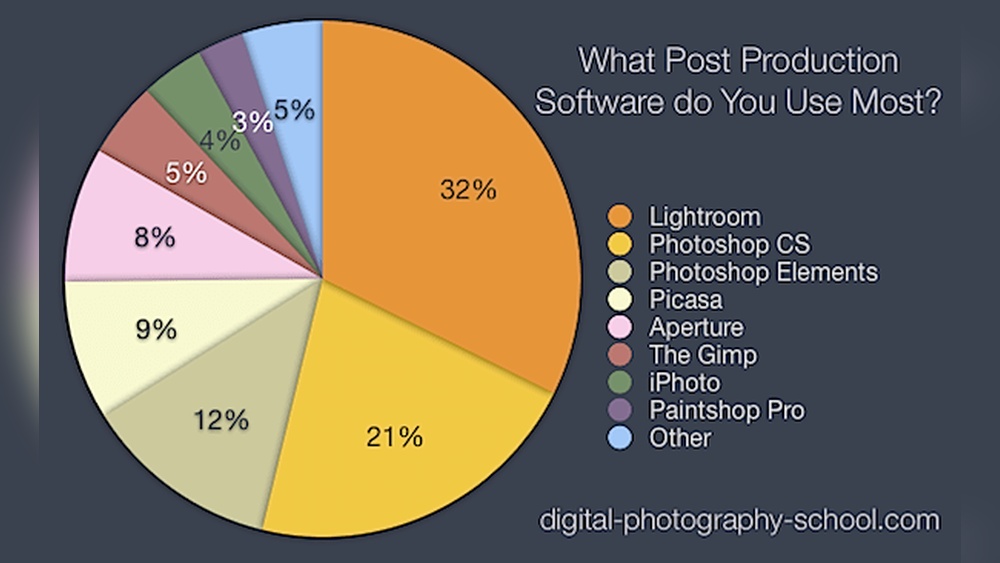
6. Adobe Lightroom – Photo Editing for Beginners
Lightroom is a simpler photo editor than Photoshop. It helps fix light, color, and sharpness. Many photographers use Lightroom to improve their photos quickly.
Beginners can use Lightroom to adjust brightness and colors. It also helps organize your photos in one place. Lightroom works well for people who want quick and easy edits.
Lightroom is best for:
- Photo adjustments
- Organizing photos
- Quick editing
7. Adobe XD – Design for Websites and Apps
XD is for designing websites and mobile apps. It lets you create how a site or app will look. You can make buttons, menus, and screens.
Beginners can start by making simple page designs. Then, try adding links to move between pages. XD helps designers show how a site or app works before coding.
Adobe XD is great for:
- Web design
- App design
- User experience (UX) design
How to Choose the Right Adobe Tool?
Think about what you want to create. Do you want to edit photos? Then Photoshop or Lightroom is good. Want to make logos or drawings? Try Illustrator.
If you want to make videos, Premiere Pro is the choice. Need animations or effects? After Effects fits well. For books or flyers, InDesign works best. For websites and apps, go for XD.
You can try more than one tool. Many creators use several Adobe programs. This helps them do different parts of their work easily.
Tips for Beginners Using Adobe Tools
- Start with simple projects.
- Watch tutorial videos online.
- Practice often to improve skills.
- Use templates to save time.
- Join online communities for help.
Credit: www.feisworld.com
Frequently Asked Questions
What Adobe Tools Are Best For Beginners?
Adobe Photoshop and Adobe Premiere Pro are great starting points. They offer easy tutorials and simple interfaces for new users.
Which Adobe Software Is Ideal For Video Editing?
Adobe Premiere Pro is perfect for video editing. It supports many file types and offers strong editing features.
Can I Use Adobe Illustrator For Logo Design?
Yes, Adobe Illustrator is excellent for logos. It provides vector graphics tools that keep designs sharp.
How Do Adobe Tools Help Content Creators?
Adobe tools help create visuals, videos, and designs. They offer creative control and professional results.
Conclusion
Adobe offers many tools for creators. Each tool has a special use. From editing photos to making videos or websites, Adobe can help you.
Start with the tool that fits your needs. Learn the basics step by step. With practice, you will get better over time.
Remember, creativity grows with patience. Use Adobe tools to bring your ideas to life.